> ## Documentation Index
> Fetch the complete documentation index at: https://aitextura.mintlify.site/llms.txt
> Use this file to discover all available pages before exploring further.
# Agent Models
> What your agent thinks with: four model slots, a catalog with prices, and connecting your own provider key directly.
Out of the box, your agent already thinks and works, so you don't need to touch the models. Come here in two cases: you have your own provider key and want to pay the provider directly, or the agent has started making mistakes and you're looking for a smarter model.
## Four slots
**Settings → Models**. Each role has its own model. This isn't duplication, it's a division of labor.
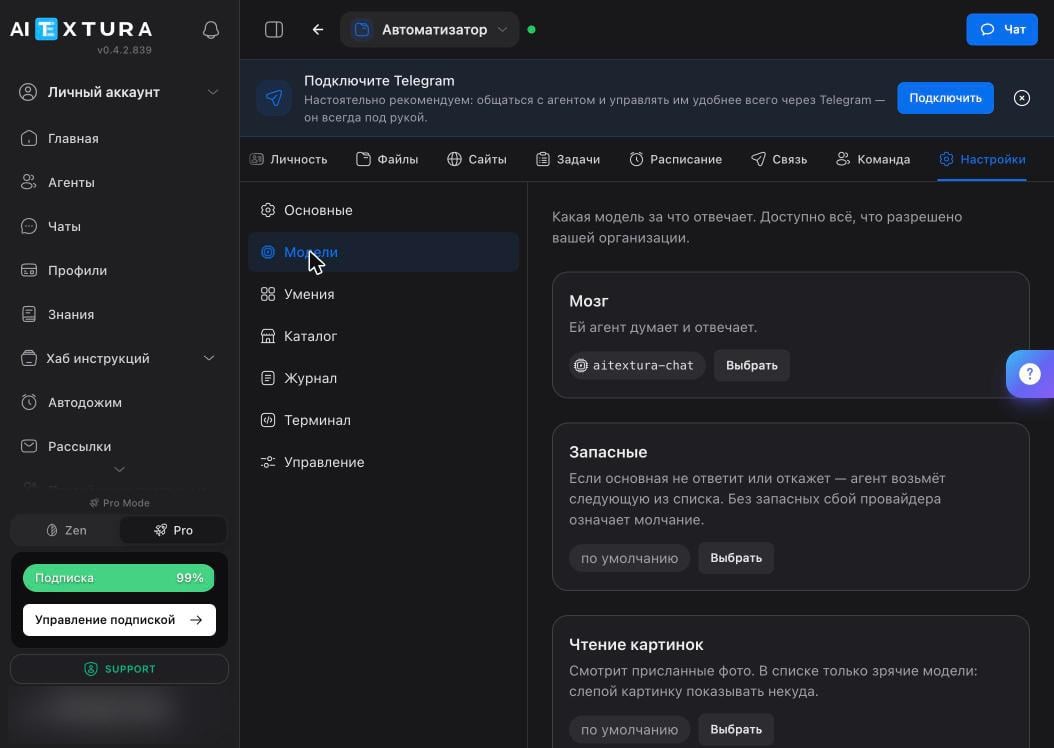 | Slot | What it does | What to consider |
| ----------------------- | ------------------------------------------------------ | ------------------------------------------------------------------------------------ |
| **Brain** | Thinks and replies. The agent's main model | Defaults to `aitextura-chat`. Change it if the agent can't handle your tasks |
| **Fallbacks** | Take over if the main model doesn't respond or refuses | Without fallbacks, a provider outage means a silent agent |
| **Image Reading** | Looks at photos you send | The list only shows vision models: there's no point showing a picture to a blind one |
| **History Compression** | Condenses a long conversation so it fits in memory | A simpler model works here: it needs to be careful, not smart |
The **Fallbacks** slot is the most underrated setting. A provider goes down for ten minutes, and all you see is a silent agent, with no idea why your scheduled tasks failed.
## Catalog
The **Select** button opens the list: about a hundred models with search and sorting.
| Slot | What it does | What to consider |
| ----------------------- | ------------------------------------------------------ | ------------------------------------------------------------------------------------ |
| **Brain** | Thinks and replies. The agent's main model | Defaults to `aitextura-chat`. Change it if the agent can't handle your tasks |
| **Fallbacks** | Take over if the main model doesn't respond or refuses | Without fallbacks, a provider outage means a silent agent |
| **Image Reading** | Looks at photos you send | The list only shows vision models: there's no point showing a picture to a blind one |
| **History Compression** | Condenses a long conversation so it fits in memory | A simpler model works here: it needs to be careful, not smart |
The **Fallbacks** slot is the most underrated setting. A provider goes down for ten minutes, and all you see is a silent agent, with no idea why your scheduled tasks failed.
## Catalog
The **Select** button opens the list: about a hundred models with search and sorting.
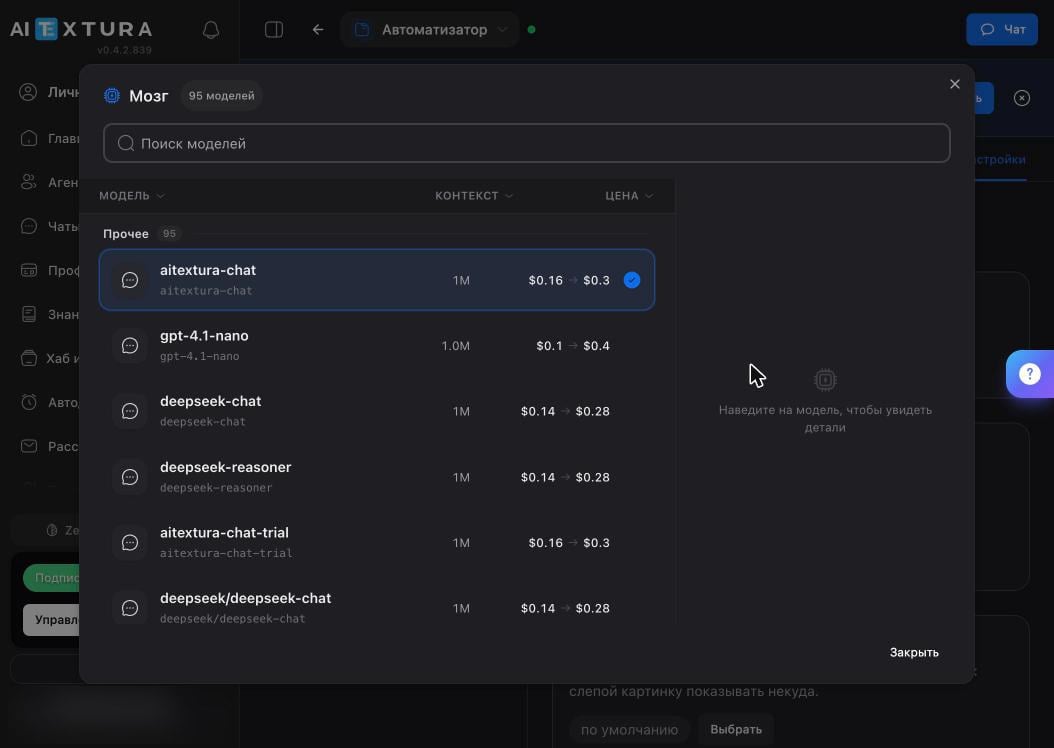 | Column | What it means |
| ----------- | --------------------------------------------------------------------------------------------------- |
| **Model** | The name. The current model has a check mark |
| **Context** | How much text the model holds at once. More context means a longer conversation before compression |
| **Price** | Input → output per 1M tokens. The first number is the cost to read, the second is the cost to reply |
| Column | What it means |
| ----------- | --------------------------------------------------------------------------------------------------- |
| **Model** | The name. The current model has a check mark |
| **Context** | How much text the model holds at once. More context means a longer conversation before compression |
| **Price** | Input → output per 1M tokens. The first number is the cost to read, the second is the cost to reply |
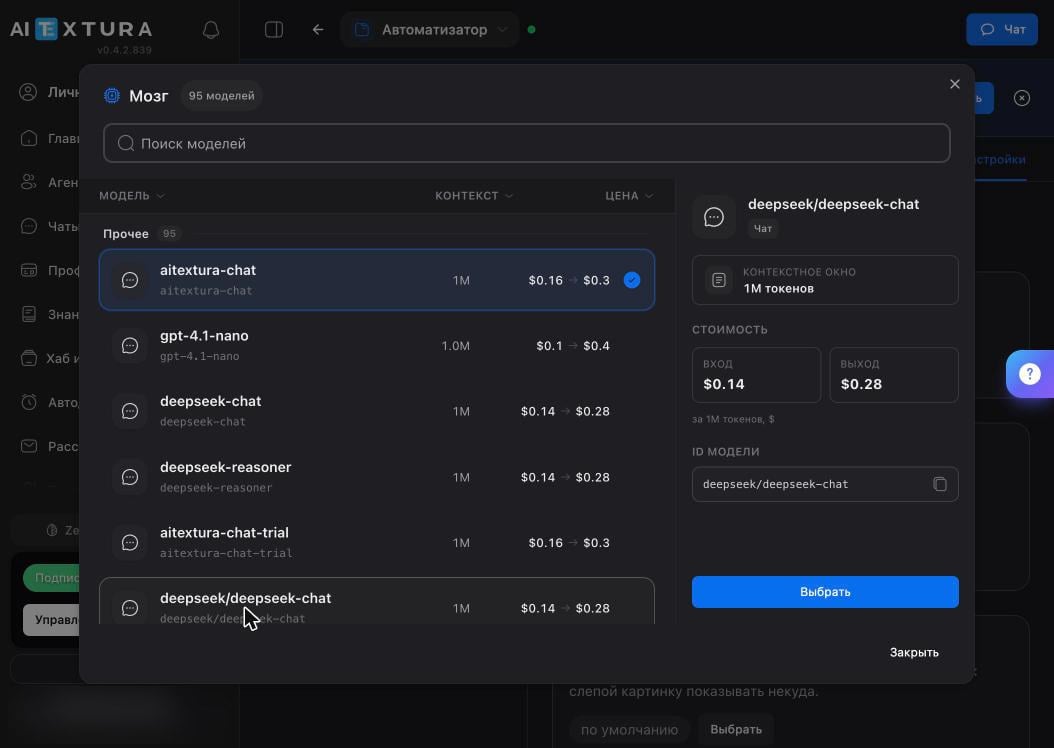 Hover over a model to open a card with details and the **Model ID** field. You'll need it if you connect the same model with your own key.
## Your own model
**Settings → General** → **Your Own Model (Your Own Key)** block. The agent will call the provider directly, bypassing the platform's infrastructure, and you'll pay the provider.
Hover over a model to open a card with details and the **Model ID** field. You'll need it if you connect the same model with your own key.
## Your own model
**Settings → General** → **Your Own Model (Your Own Key)** block. The agent will call the provider directly, bypassing the platform's infrastructure, and you'll pay the provider.
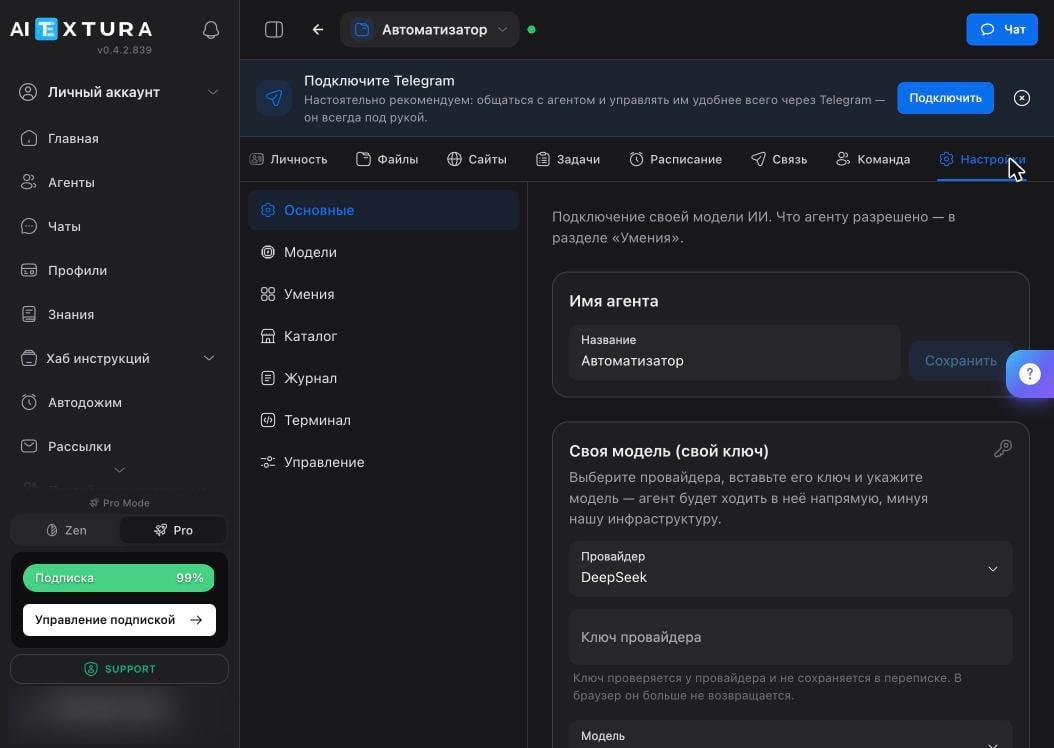 The **Provider** list: who you buy access from.
The **Provider Key** field. The key is verified with the provider, isn't stored in the conversation, and is never sent back to the browser.
Once you enter the key, the model list loads automatically. You can also type the name manually. The platform checks whether the model understands photos when you connect it, so you don't need to specify that.
The platform contacts the provider and confirms the key works.
This is also where, in **General**, you change the agent's name: the one shown in the list and in the workspace.
## What it costs
The agent spends budget on every action: a conversation, a scheduled task, reading a file, overnight memory cleanup. Keep this in mind when you set up the [schedule](/en/agents/schedule): monitoring every 30 minutes costs dozens of times more than a daily summary.
You can see spending and the remaining balance in **Billing** and [Charge History](/en/guides/finance). They're shared across the whole account.
## FAQ
First, check the documents on the [Personality](/en/agents/personality) tab and how the task is worded: a vague task produces confident nonsense on any model. Change the model when the task is clearly described and the result still misses.
This looks like an outage at the main model's provider. Fill in the **Fallbacks** slot so the agent switches over on its own. You can see what happened in the [Log](/en/agents/maintenance).
Check the **Image Reading** slot: if it holds a model without vision, the picture is simply never shown to it.
That's history compression. Put a model with a larger context in the **Brain** slot, and keep important facts in memory files: they aren't compressed.
It depends on the provider and volume. The practical value of your own key isn't only the price: it's your own limit and your own quota, independent of the account's shared budget.
## What's next
What the agent is allowed to do
Log, diagnostics, backup
The main source of ongoing spending
Where the account budget goes
The **Provider** list: who you buy access from.
The **Provider Key** field. The key is verified with the provider, isn't stored in the conversation, and is never sent back to the browser.
Once you enter the key, the model list loads automatically. You can also type the name manually. The platform checks whether the model understands photos when you connect it, so you don't need to specify that.
The platform contacts the provider and confirms the key works.
This is also where, in **General**, you change the agent's name: the one shown in the list and in the workspace.
## What it costs
The agent spends budget on every action: a conversation, a scheduled task, reading a file, overnight memory cleanup. Keep this in mind when you set up the [schedule](/en/agents/schedule): monitoring every 30 minutes costs dozens of times more than a daily summary.
You can see spending and the remaining balance in **Billing** and [Charge History](/en/guides/finance). They're shared across the whole account.
## FAQ
First, check the documents on the [Personality](/en/agents/personality) tab and how the task is worded: a vague task produces confident nonsense on any model. Change the model when the task is clearly described and the result still misses.
This looks like an outage at the main model's provider. Fill in the **Fallbacks** slot so the agent switches over on its own. You can see what happened in the [Log](/en/agents/maintenance).
Check the **Image Reading** slot: if it holds a model without vision, the picture is simply never shown to it.
That's history compression. Put a model with a larger context in the **Brain** slot, and keep important facts in memory files: they aren't compressed.
It depends on the provider and volume. The practical value of your own key isn't only the price: it's your own limit and your own quota, independent of the account's shared budget.
## What's next
What the agent is allowed to do
Log, diagnostics, backup
The main source of ongoing spending
Where the account budget goes