> ## Documentation Index
> Fetch the complete documentation index at: https://aitextura.mintlify.site/llms.txt
> Use this file to discover all available pages before exploring further.
# Agent Team
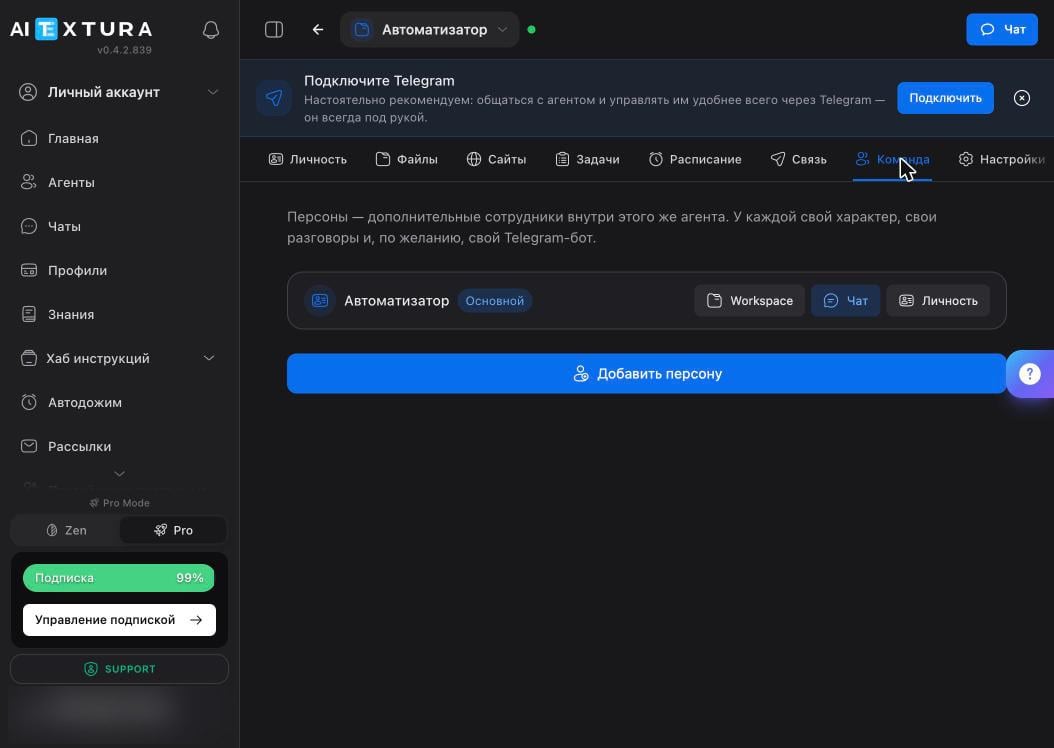
> Personas are additional workers inside a single agent: each with its own character, its own conversations, and, optionally, its own Telegram bot.
An agent juggling five areas of responsibility performs worse than one focused on a single area — working memory is finite. **Team** solves this inside the same agent: you create a persona for each job, and each one has its own character and its own conversations.
 An agent persona is not the same as an [AI Employee's Persona](/en/guides/persona). There, it's the instructions the AI Employee follows when talking to customers; here, it's a separate worker inside the agent.
## Persona card
A new agent has one persona — the main one, marked with a **Main** badge. Each card has three buttons.
| Button | What it opens |
| --------------- | ------------------------------------------------------------------------------------------------- |
| **Workspace** | This persona's files |
| **Chat** | A conversation with this persona specifically |
| **Personality** | Its character and memory — the same documents as on the [Personality](/en/agents/personality) tab |
The **+ Add persona** button creates a new one: give it a name, describe its character, and from then on it works as a separate worker, but inside the same container.
## Why split the work
The classic setup is a pipeline where everyone has their own job.
| Persona | What it does |
| ---------- | ------------------------------------------------------- |
| Researcher | Gathers news and materials on a topic |
| Writer | Turns them into text in your style |
| Reminder | Sends the finished result to Telegram at the right time |
You can give each one its own Telegram bot — then in the messenger they appear as different contacts, and you message whichever one you need directly.
## Persona or a second agent
| | Persona | Second agent |
| ------------------- | -------------------------------------------------- | ------------------------------------------------- |
| Working environment | Shared with the other personas | Its own, fully separate |
| Files and skills | Shared across the container | Its own |
| Limit | The interface doesn't limit the number of personas | No more than two deployed agents per account |
| When to choose | Tasks in one area that work with shared materials | Different areas, different access, different risk |
The rule is simple: different roles in the same job — personas. Different jobs — different agents.
Personas share one container: they have the same files, the same skills, and the same access. Don't put a persona that handles email and money next to one you use for rough experiments.
## FAQ
Each has its own conversations, but files and the working environment are shared. To hand work between personas, use a file in `workspace`.
Yes, each can have its own Telegram bot. You create it the same way as the main one — on the [Connect](/en/agents/connect) tab.
The main persona is the agent itself, so it always stays. The only thing you can change is its character: the documents on the [Personality](/en/agents/personality) tab.
Exactly as many as you have distinct roles in one job. A persona you talk to once a month only adds confusion — it's easier to keep that task with the main one.
## What's next
A persona's character is made of the same text documents
A separate bot for each persona
A shared board that shows all the work
What the container the personas live in can do
An agent persona is not the same as an [AI Employee's Persona](/en/guides/persona). There, it's the instructions the AI Employee follows when talking to customers; here, it's a separate worker inside the agent.
## Persona card
A new agent has one persona — the main one, marked with a **Main** badge. Each card has three buttons.
| Button | What it opens |
| --------------- | ------------------------------------------------------------------------------------------------- |
| **Workspace** | This persona's files |
| **Chat** | A conversation with this persona specifically |
| **Personality** | Its character and memory — the same documents as on the [Personality](/en/agents/personality) tab |
The **+ Add persona** button creates a new one: give it a name, describe its character, and from then on it works as a separate worker, but inside the same container.
## Why split the work
The classic setup is a pipeline where everyone has their own job.
| Persona | What it does |
| ---------- | ------------------------------------------------------- |
| Researcher | Gathers news and materials on a topic |
| Writer | Turns them into text in your style |
| Reminder | Sends the finished result to Telegram at the right time |
You can give each one its own Telegram bot — then in the messenger they appear as different contacts, and you message whichever one you need directly.
## Persona or a second agent
| | Persona | Second agent |
| ------------------- | -------------------------------------------------- | ------------------------------------------------- |
| Working environment | Shared with the other personas | Its own, fully separate |
| Files and skills | Shared across the container | Its own |
| Limit | The interface doesn't limit the number of personas | No more than two deployed agents per account |
| When to choose | Tasks in one area that work with shared materials | Different areas, different access, different risk |
The rule is simple: different roles in the same job — personas. Different jobs — different agents.
Personas share one container: they have the same files, the same skills, and the same access. Don't put a persona that handles email and money next to one you use for rough experiments.
## FAQ
Each has its own conversations, but files and the working environment are shared. To hand work between personas, use a file in `workspace`.
Yes, each can have its own Telegram bot. You create it the same way as the main one — on the [Connect](/en/agents/connect) tab.
The main persona is the agent itself, so it always stays. The only thing you can change is its character: the documents on the [Personality](/en/agents/personality) tab.
Exactly as many as you have distinct roles in one job. A persona you talk to once a month only adds confusion — it's easier to keep that task with the main one.
## What's next
A persona's character is made of the same text documents
A separate bot for each persona
A shared board that shows all the work
What the container the personas live in can do