

- The thumbs-down button on any AI reply — starts a 4-step review that creates a ticket automatically.
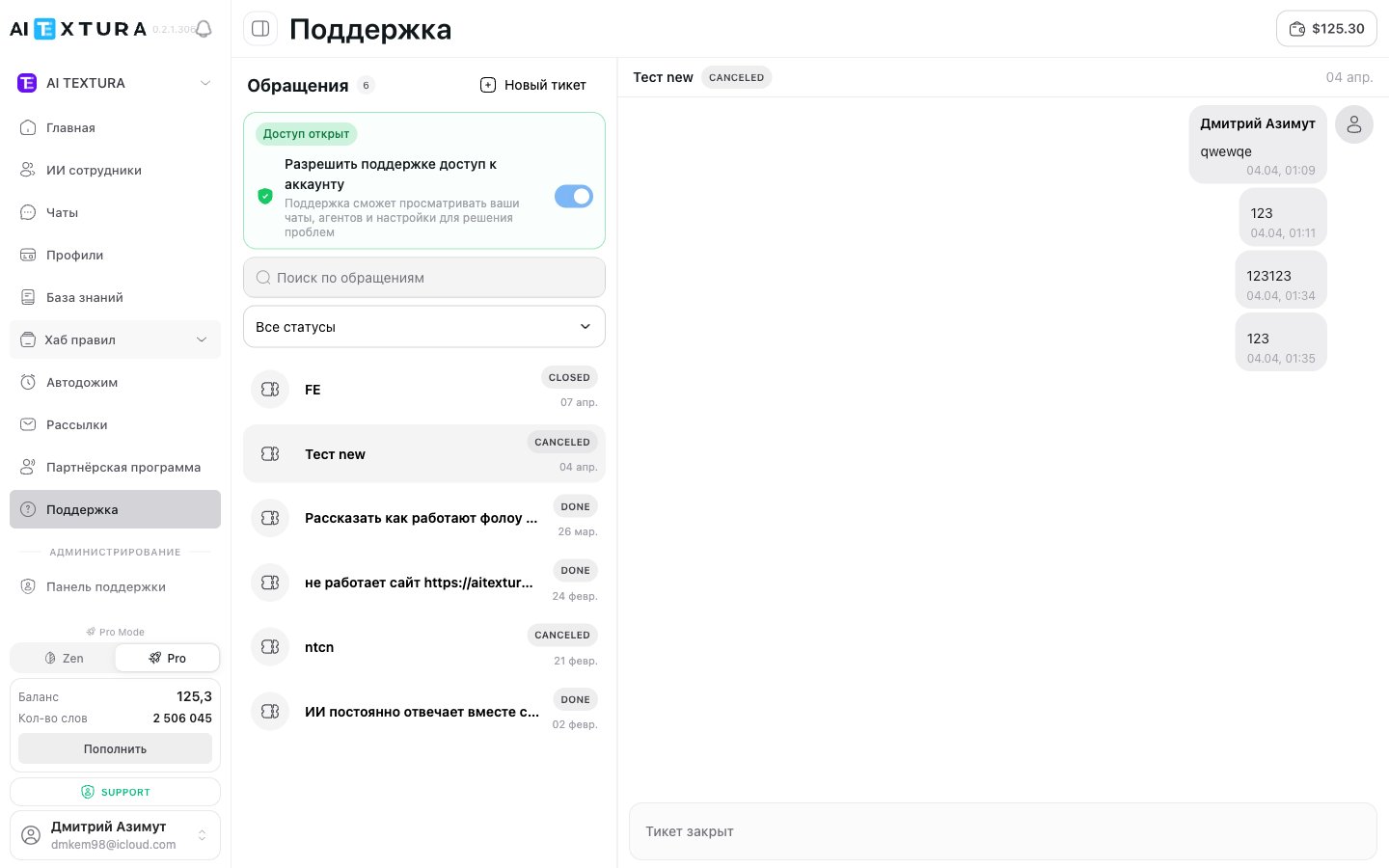
- The Support access to account toggle — lets the team look at your chats, agents, and settings so they can solve the problem faster.
Account Settings
Your account preferences
Billing
Balance and charge history
AI Employees
Managing AI Employees
Channels
Connecting communication channels
Support access to your account
At the top of the Support page is the Allow support to access account toggle (new in v2.5.0). When it’s on, the status Access granted appears next to it.How to report an AI reply (thumbs down)
If an AI Employee gave a customer a wrong reply, you don’t need to create a ticket manually — the message has a Mark reply as unhelpful button (thumbs down). It starts a 4-step review: the platform first tries to explain the cause of the bad reply on its own, and if you still have questions, it creates a request to the AI training team with an automatically attached “Context report”.Video guide
Where to find the button
In the Chats section, open any conversation. Every AI Employee message has a thumbs-down button (aria-label:Mark reply as unhelpful). Click it to open a review dialog.
Step 1 of 4 — Bad reply review
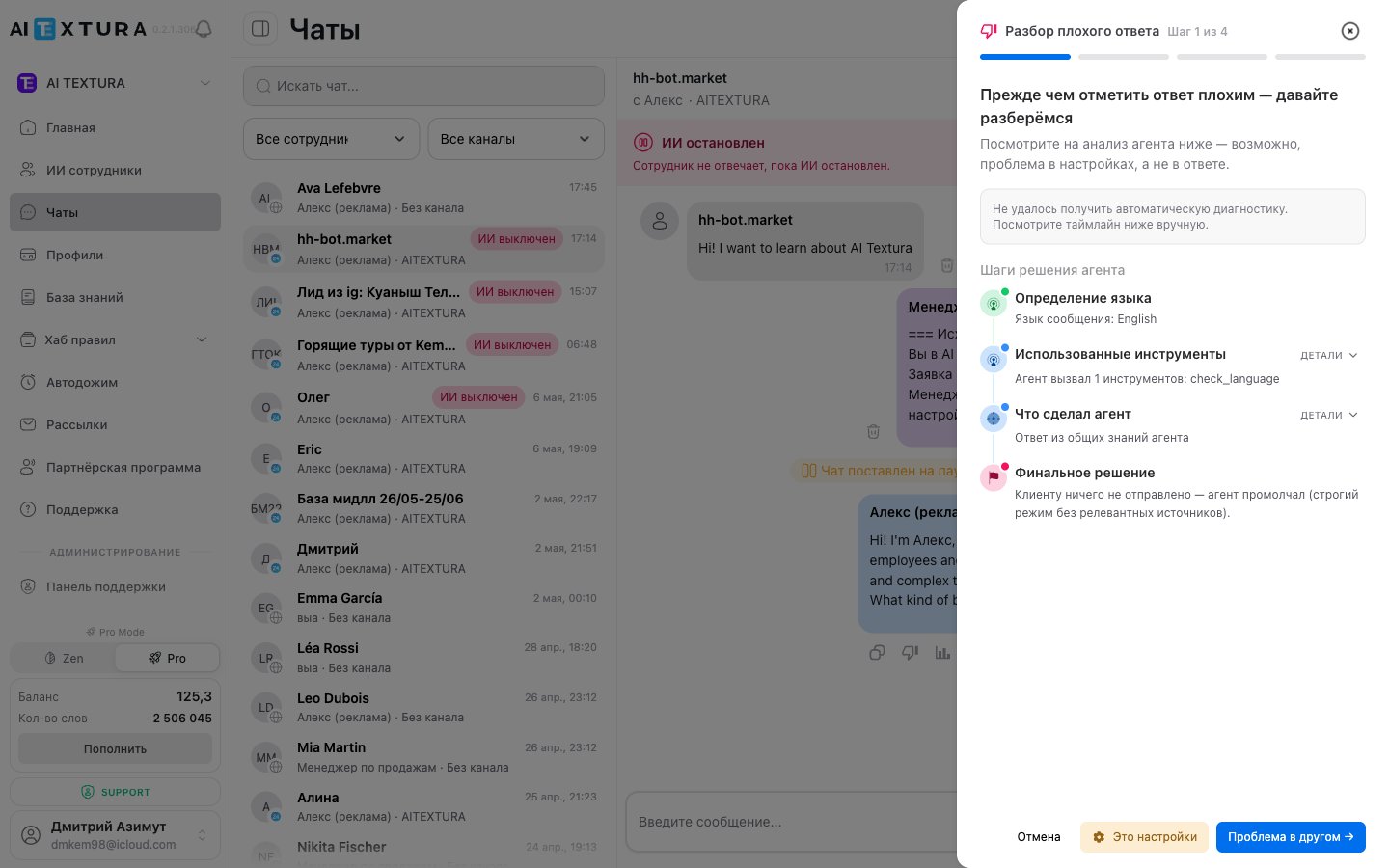
At the bottom are three buttons:
If automatic diagnostics aren’t available, the platform shows: “Couldn’t get automatic diagnostics. Review the timeline below manually.” This is rare — proceed as usual and describe the problem in step 3.
Step 2 of 4 — Check the instructions and tools
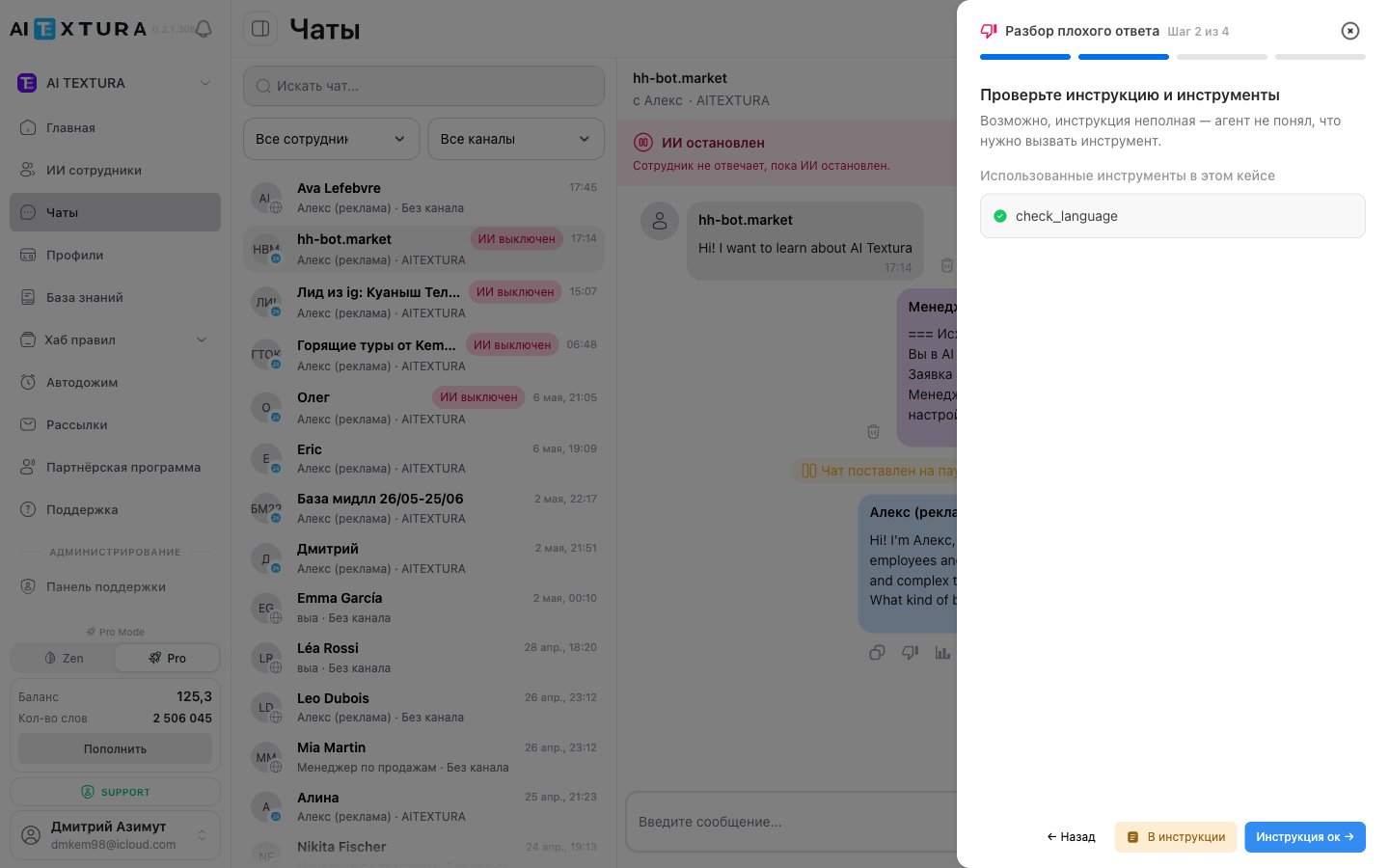
check_language, Knowledge Base search, CRM operations, etc.).
You decide whether the Persona or the working rules themselves are to blame:
Step 3 of 4 — Describe the problem
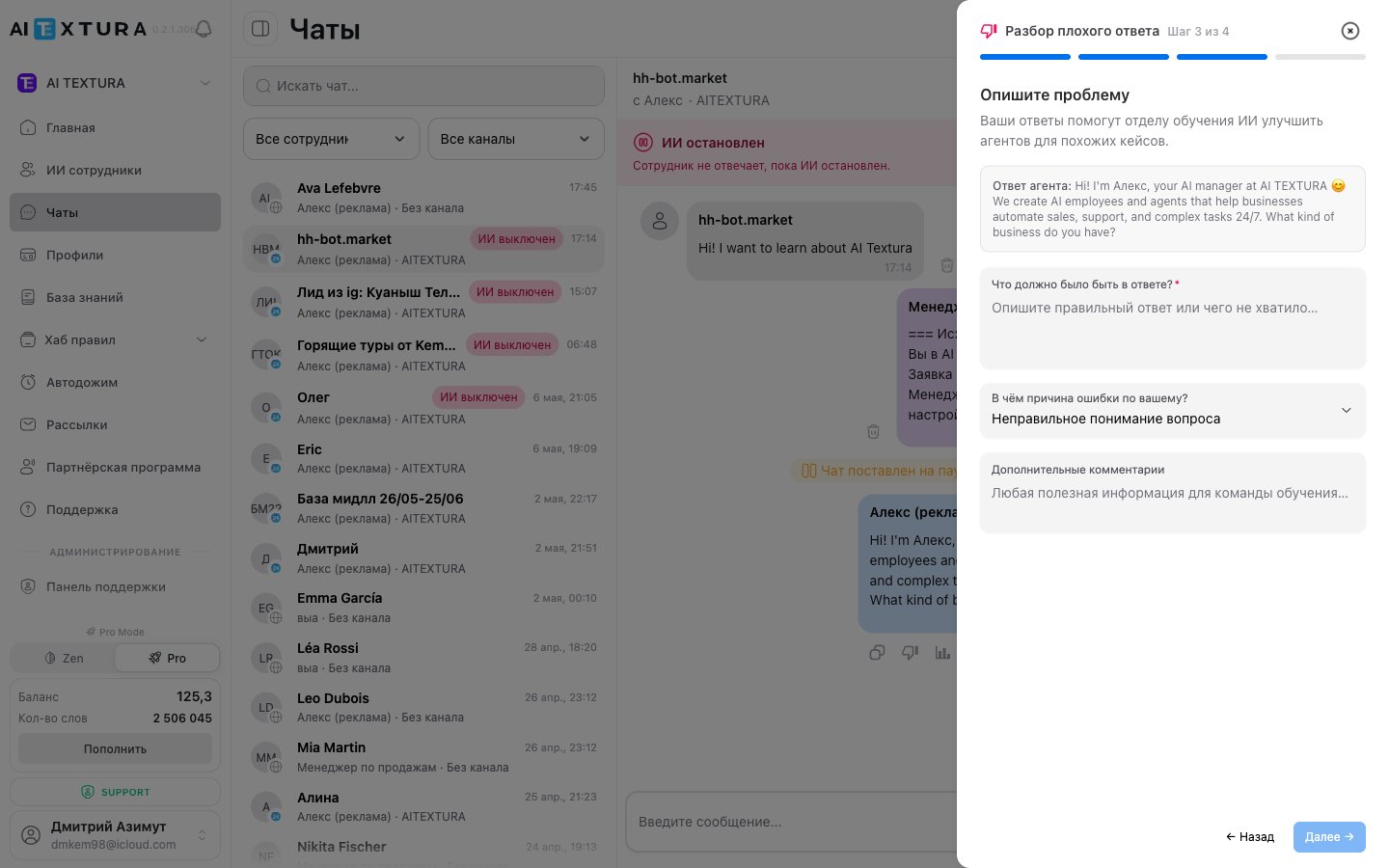
Cause options
The Next → button becomes active only after you fill in the first textarea.
Step 4 of 4 — Thank you! Your feedback matters
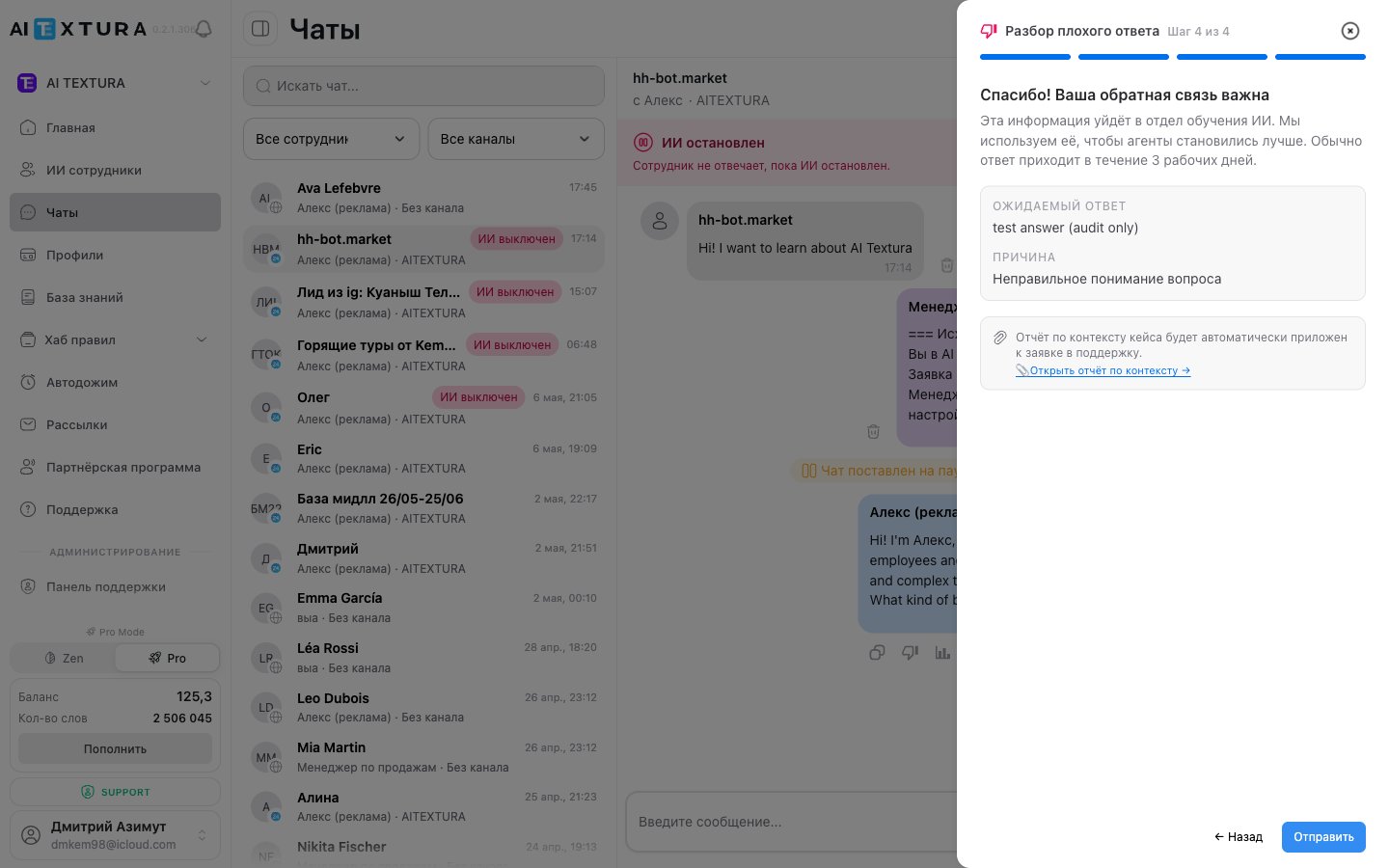
- Summary:
Expected reply: {your text from step 3},Cause: {selected cause}. - Message: “This information will go to the AI training team. We use it to make agents better. A reply usually arrives within 3 business days.”
- Key point: “The case context report will be automatically attached to the support request.”
- The 📎 Open context report → link — lets you view a detailed report of the agent’s decision steps before sending.
- Buttons:
← Back,Send.
Thumbs down is not just a rating for analytics. It’s a ticket format for a specialized team: it automatically collects all the technical information (message language, talents used, Knowledge Base search results, the agent’s final decision) and attaches it to the request. The team doesn’t need to ask you for context — it’s already there.
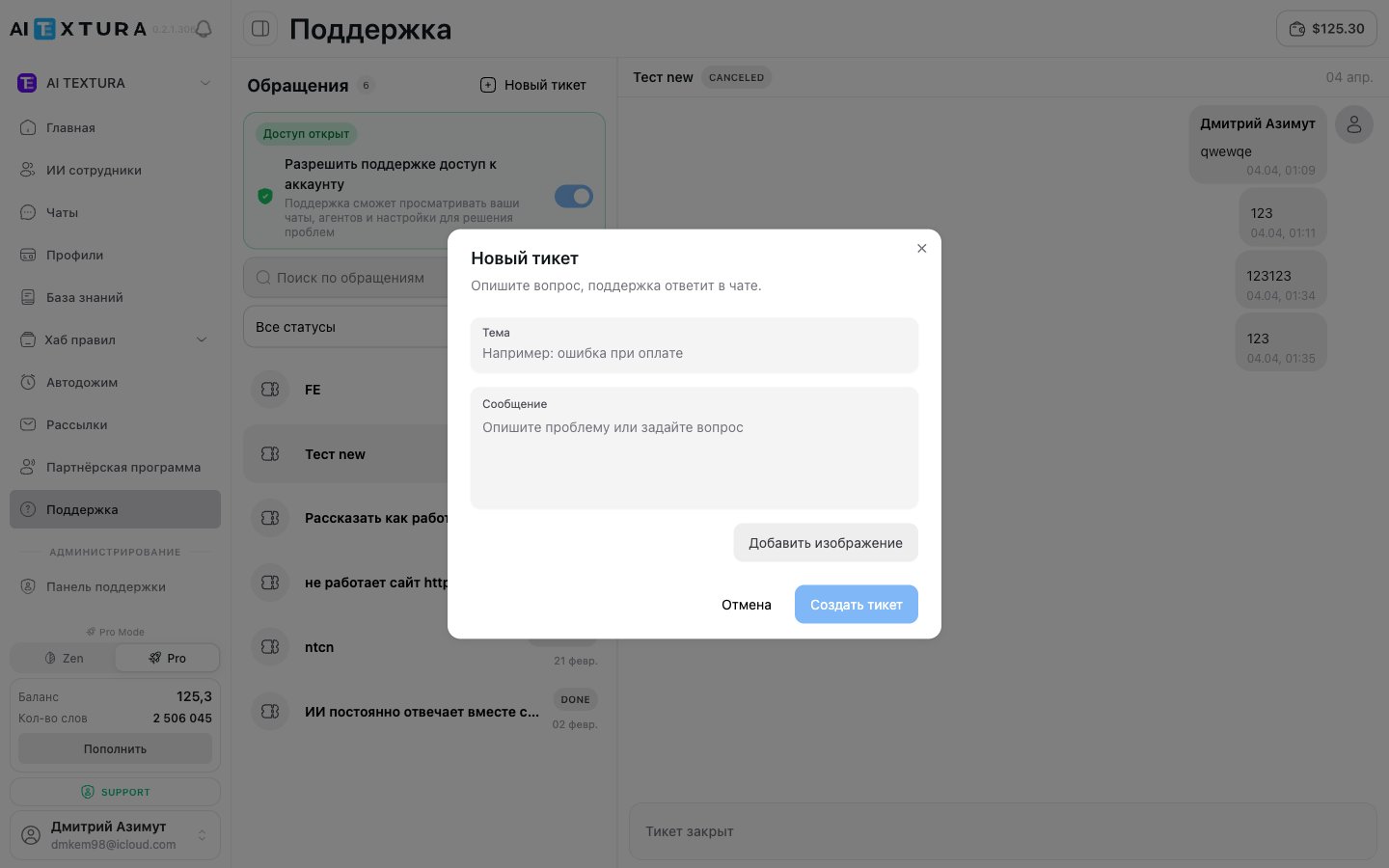
How to create a new ticket
1
Open the Support section
Click Support in the platform’s left menu.
2
Click + New ticket
The button is at the top of the page.
3
Enter a title
Briefly describe the essence of the question or problem.
4
Write the first message
Explain in detail what happened or what you need. Specify which AI Employee or feature it concerns, what you did, and what went wrong.
5
Send the ticket
Once created, the ticket appears in the request list with the On Customer status.
Messaging inside a ticket
After you create a ticket, the conversation takes place in chat format — right in the right-hand panel of the Support section. Your messages appear on the right, the team’s replies on the left. To send a message:- Open the ticket by clicking it in the list.
- Type your text in the input field at the bottom.
- Send the message.
If you want to add to your request, just write a new message in the same ticket. You don’t need to create a separate request.
Ticket statuses
Each ticket has one of two statuses:
The status updates automatically: when the team replies and waits for your response, the ticket moves to On Customer. When the issue is resolved, the team moves the ticket to Done.
Searching and filtering requests
If you’ve accumulated a lot of tickets, two tools help you find the one you need quickly:Response times
The AI Textura team tries to respond to requests as quickly as possible. Approximate times:Tips for effective requests
- One question — one ticket. This makes it easier for the team to track and resolve each task.
- Answer the team’s questions — it speeds up the resolution.
To get the fastest response to your request, attach the following to your ticket:
- A screenshot of the error — attach the image right in the message so the team can see what’s happening immediately.
- A link to the conversation — open the Chats section, find the conversation, and copy the URL from your browser’s address bar. That way support can see the conversation and understand the situation.
- Steps to reproduce (if the error is complex) — describe step by step what to do to reproduce the error. This lets the team repeat the scenario and see in the conversation how it works.
Title: “Booking link doesn’t work” Message: “The ‘Concierge’ AI Employee in Telegram sends customers a booking link, but it opens a blank page. Link: [URL]. The problem started yesterday. Conversation link: https://app.aitextura.com/chats/… To reproduce: write to the bot ‘book a room for March 20’ — the reply will contain a broken link.”
FAQ
Can I attach a screenshot or file to a ticket?
Can I attach a screenshot or file to a ticket?
Yes! You can attach images and files right in a ticket message. We recommend always adding a screenshot of the error — it speeds up the resolution considerably.
How do I know I've received a reply?
How do I know I've received a reply?
A red indicator with the number of unread messages appears next to the ticket in the request list.
Can I reopen a closed ticket?
Can I reopen a closed ticket?
No. If the issue comes back, create a new ticket. You can reference the previous request in the text.
How many tickets can I create?
How many tickets can I create?
There’s no limit. Create as many requests as you need.
Who answers the requests?
Who answers the requests?
The AI Textura support team — real people who know the platform inside out. It’s not a bot.
Is support available 24/7?
Is support available 24/7?
The team works during business hours (Moscow time), but critical requests may be handled outside the standard schedule.
How is thumbs down different from a regular ticket?
How is thumbs down different from a regular ticket?
Thumbs down is a specialized channel for requests about AI reply quality. The platform collects all the technical information itself (message language, talents, Knowledge Base, final decision) and attaches it to the ticket. The request goes to the AI training team. A regular ticket is a free-form request to general support: questions about billing, connecting channels, access, and so on.
Is it safe to turn on Support access to account?
Is it safe to turn on Support access to account?
Yes. Access is granted only to AI Textura support staff and is used to diagnose your problems. All actions are logged on the platform side. Once the ticket is resolved, we recommend turning the toggle off — you can do this at any time on the Support page.
What's in the Context report attached via thumbs down?
What's in the Context report attached via thumbs down?
The report includes: the language of the customer’s message, the list of talents called and their results, what was found in the Knowledge Base, and what final decision the agent made. You can view the report before sending via the ”📎 Open context report” link in step 4.
The platform or my account won't open
The platform or my account won't open
First, check
status.aitextura.com — maintenance and outages are posted there, and urgent updates are duplicated in the platform’s Telegram channel. If the status is green, try another browser and clear your cache, then write to us.The AI Employee stopped replying completely -- where do I start
The AI Employee stopped replying completely -- where do I start
In order: your word balance isn’t at zero; the AI Employee is turned on and its channel is active; turn the channel off and on again — this rebuilds the connection; check
status.aitextura.com. If everything is fine, create a ticket and attach a link to the conversation.OpenAI is down -- what should we do
OpenAI is down -- what should we do
Nothing. The platform switches to backup models automatically; replies may be slower than usual during that time.
Which models does the platform run on
Which models does the platform run on
On models from OpenAI, Google, and other leading providers — the platform doesn’t train its own models. The platform itself is written in NodeJS with Python modules.
Where can I watch training videos
Where can I watch training videos
On the AI TEXTURA YouTube channel. Videos for specific sections are embedded right in the documentation articles — on the Persona, Knowledge Base, Talents, Notifications pages, and others.