

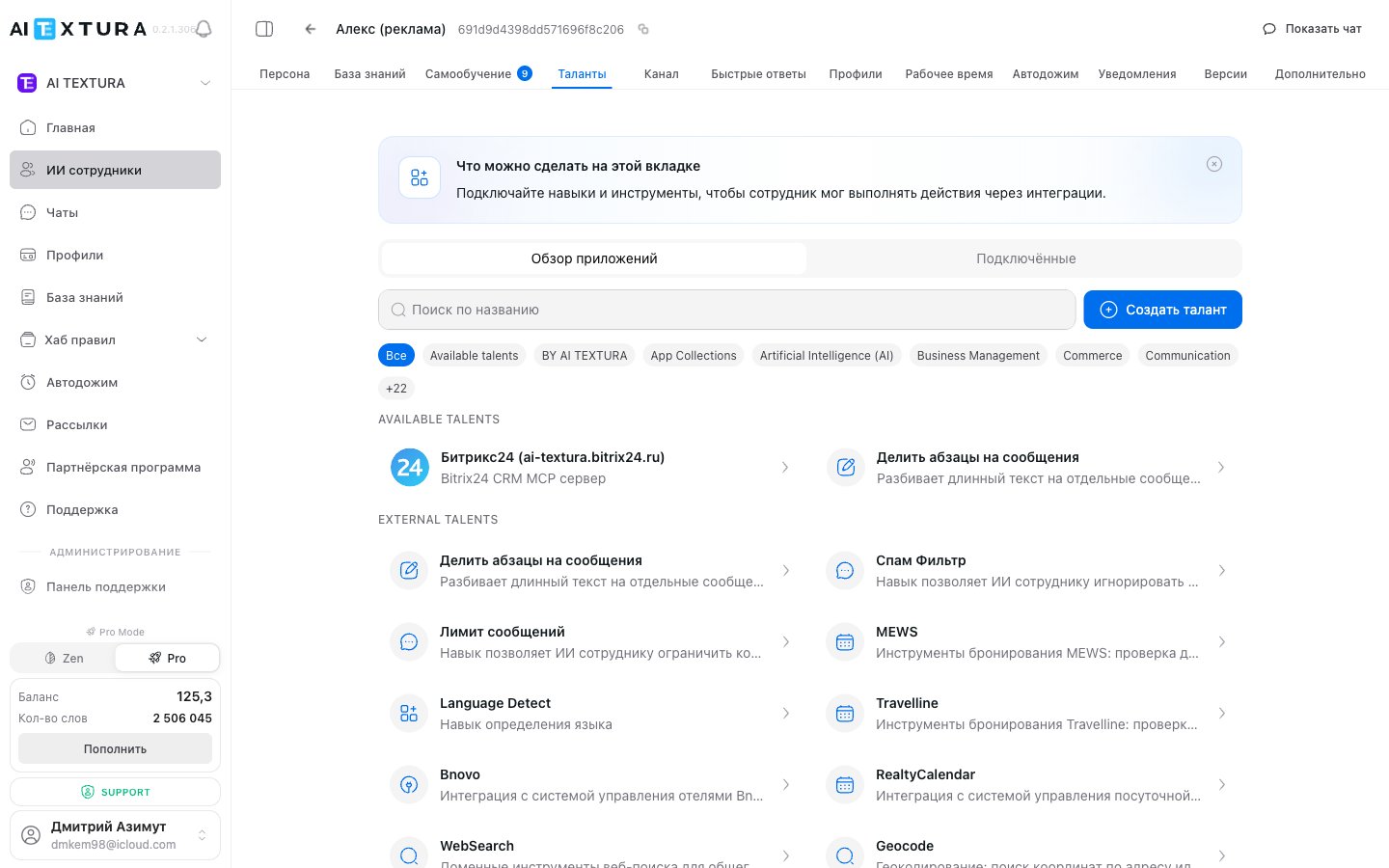
Two subtabs
App overview is the catalog of everything you can connect. Connected shows what’s already working for the employee you’re configuring. Talents are connected to each employee separately.What you can connect
More than 3,000 services: CRM and ERP, hotel PMS, stores and payments, messengers, email and mailings, spreadsheets and documents, databases, AI services. Search by name or narrow the list with a category filter.How to connect
Click a talent’s card and follow the instructions in the window — usually you paste an API key or sign in to the service with your account. Then click Connect talent, and it appears on the Connected subtab.Service-specific walkthroughs — Bitrix24, amoCRM, Travelline, Bnovo, MEWS, and others — are in the detailed guide to connecting talents.
Describe it in the Persona
A connected talent gives the employee an ability, but not a reason to use it. Always spell out in the Persona when and under what conditions it should use the talent. Example rules for each service are in the detailed guide to connecting talents.Your own talent
If the service you need isn’t in the catalog, connect your own MCP server with the Create talent button. This is a job for a developer: the server has to be written and hosted. If someone on your team codes — even with an AI assistant — they can handle it.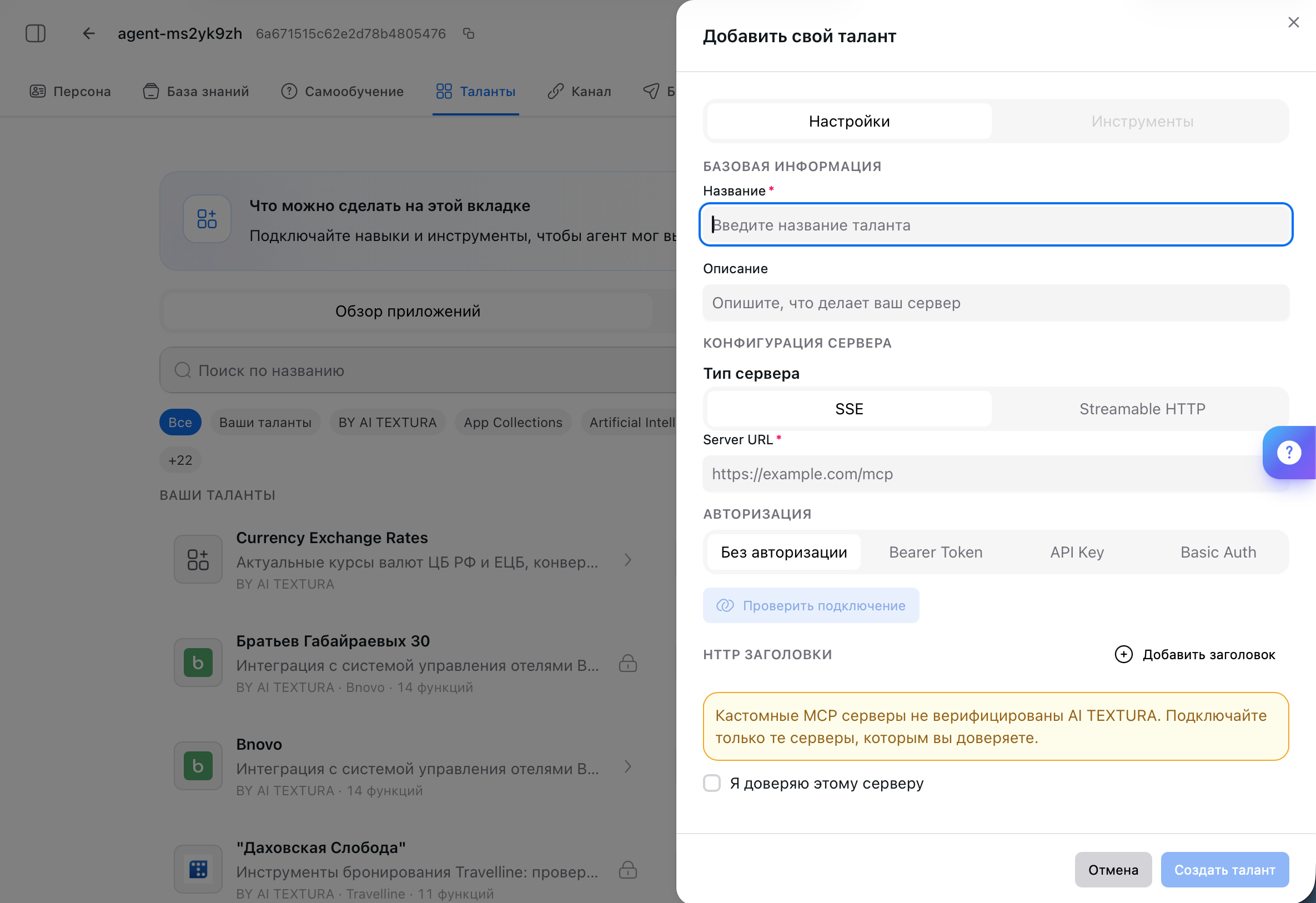
1
Fill in the basics
The talent’s Name and Description — what your server can do. The employee sees the name in its list of tools.
2
Specify the server
Server type — SSE or Streamable HTTP, depending on the implementation. Server URL — an address like
https://example.com/mcp.3
Choose authorization
No authorization, Bearer Token, API Key, or Basic Auth. Add your own HTTP headers if needed.
4
Click Test connection
The platform contacts the server and shows whether it responds. The Tools tab lists the functions the server exposes.
5
Confirm trust and create
Check I trust this server and click Create talent.
FAQ
The talent is connected, but the employee doesn't use it
The talent is connected, but the employee doesn't use it
The Persona has no rule for when to call it. Add a line like “when the customer asks about [situation], use [tool name]” and check it in the test chat. Example rules for each service are in the detailed guide to connecting talents.
How is a talent different from a channel?
How is a talent different from a channel?
A channel is where messages come from (Telegram, WhatsApp, Bitrix24 Open Channels). A talent is what the employee can do in response.Bitrix24 and amoCRM exist in both places: the channel is for talking to the customer, the talent is for working inside the CRM.
The employee stopped performing actions it used to perform
The employee stopped performing actions it used to perform
Most likely the authorization broke: the token expired, the webhook was revoked, or the service password changed. Open the Connected subtab and reconnect the talent.If that doesn’t help, contact Support.
Can I connect the same talent twice?
Can I connect the same talent twice?
Not to the same employee: a talent is connected to it once. But you can connect the same talent to different employees, each with its own settings.Always give connected talents clear names — otherwise you won’t be able to tell them apart.
How many talents can I connect to one employee?
How many talents can I connect to one employee?
There’s no limit. But each talent has to be described in the Persona — when exactly the employee uses it. The more talents you add, the more tangled this logic gets and the more often the employee picks at random, so don’t overdo it.
Are talents included in the plan?
Are talents included in the plan?
Talents themselves don’t cost extra. A third-party service may charge on its side — a subscription or payment fees.
What’s next
Detailed guide
Step by step for each service: Bitrix24, amoCRM, PMS, payments, databases
Persona
Where to describe when the employee calls a talent
Channels
Where customer messages come from
Notifications
Learn about important events in time